 terminal
A macOS-native terminal workspace for AI-driven development.
Run your coding agents in the shell you already use — and read the diff, the git state, and the files they touched without leaving it.
Free, no telemetry, no subscription.
xattr -dr com.apple.quarantine /Applications/Terminal.app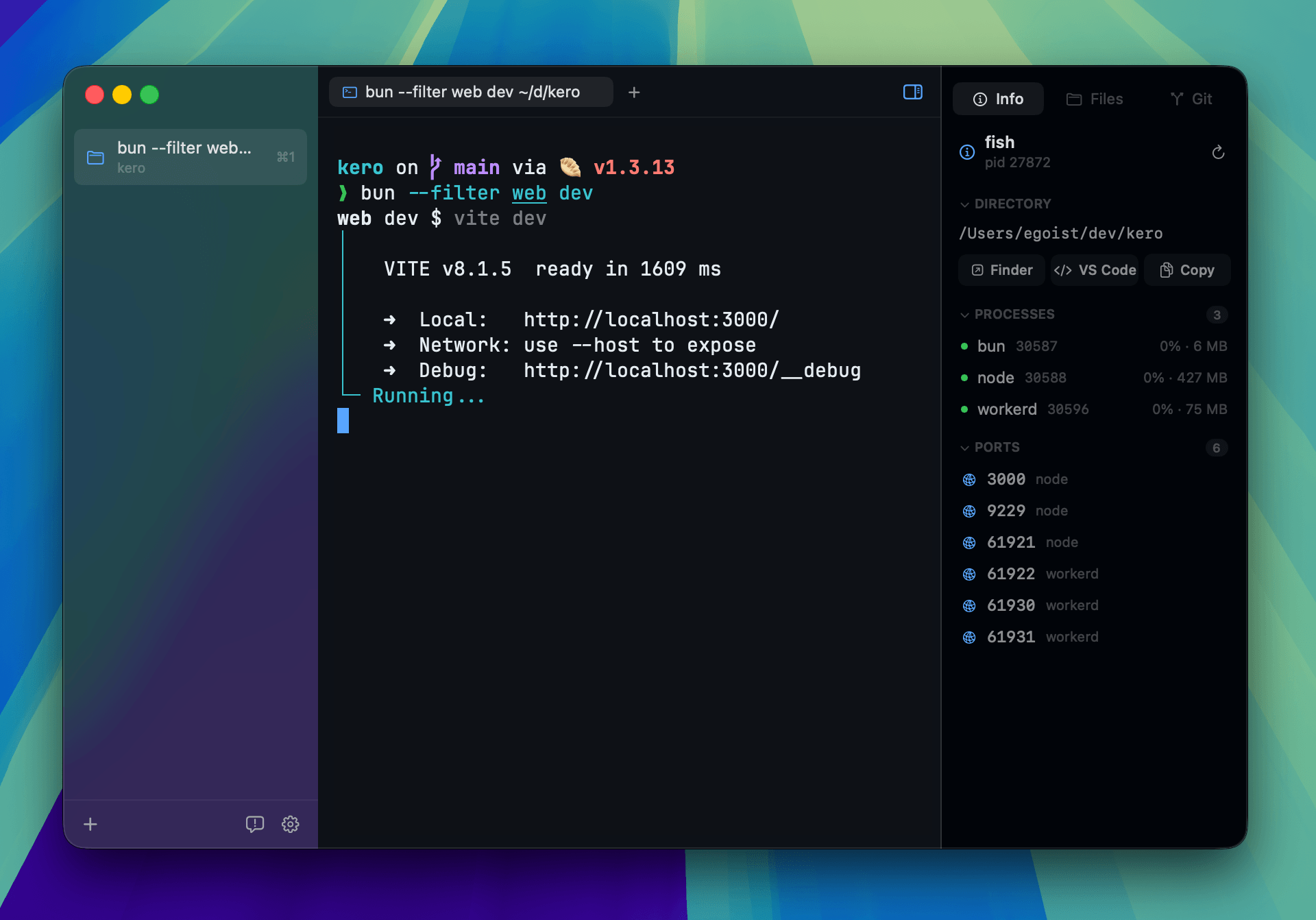
Features
beyond kero
- Compare any revisionCmd+Shift+C puts a branch, a commit, or any revision git understands beside your working tree — read the diff, keep editing your side, blame a line, revert a file
- One diff view, everywherethe Git panel's diffs open in that same side-by-side view rather than a separate web-rendered one, so an unstaged change sits beside your live file and can be fixed and saved right there — with blame, and following a terminal over ssh like the panels do. Commits in the history open the same way, against their parent
- The panels follow you over sshconnect to another machine and Files, Git, and Compare all describe that machine — the tree browses it, Git shows its branch, history and changed files, and Compare puts any revision beside its working tree, all read-only over the connection you already have. They follow you as you cd around that host with nothing to set up there, and a host that would need a password says so instead of hanging
- Files that open instantlyswitching back to an open file keeps its undo history instead of rebuilding the editor, and a large one no longer stalls as you scroll
- Hardened against untrusted inputa folder you open cannot make its own git config run commands, links that leave the browser ask first, and saved scrollback is yours to read alone
- Builds without ceremonymake build, run, test, install — unsigned by default, so it launches without a Developer ID
projects & sessions
- Projects, not windowseach repo is a project in the sidebar — Cmd+1–9 switches, Cmd+N adds one
- Sessions per projectopen as many terminal tabs as a project needs with Cmd+T, each with its own directory and scrollback — one per agent run, kept apart
- Split panesCmd+D splits right, Cmd+Shift+D splits down, Opt+Cmd+arrows moves focus between panes, or drag a tab onto the content to split it there — a tab that is already split keeps its panes and their proportions
- Agents that hand offan agent in one pane can split another, start Claude Code, Codex or seven other CLIs there, prompt it and wait for the result with terminal +pane and terminal +agent — kept inside its own project, never stealing focus, with a badge on every pane, tab and project saying who is working, blocked or done, an agents list at the bottom of the sidebar naming every one across projects, and Cmd+Shift+A to jump to the next one waiting on you
- Clear the clutterClose Files and Close Diffs in a tab's context menu drop those panes everywhere at once, leaving the terminals alone
- Restored on relaunchquit and reopen: projects, tabs, and pane layout come back, each shell fresh beneath its previous scrollback, and a pane that was running Claude Code or Codex picks its conversation back up where it left off
- Command paletteCmd+P to jump to any project or session, or run any command
review what the agent wrote
- Git panelstage, unstage, discard, and commit — amend included — beside the shell that made the changes, with each operation showing its progress on the control you used
- Readable historyopen a commit in Recent Commits to see the files it touched, and click one to read that file as it changed — branch and tag names show beside the commits they point at
- Inline diffsclick a changed file to read its diff in place, side by side with your live file — fix it right there and press Cmd+S, without leaving the window
- Branch workswitch or create a branch, fetch, fast-forward pull, push, publish a new upstream, or stash
- Repository toolbaran optional bar under the active tab showing the branch and the lines added and deleted so far — or Clean when there is nothing pending — with a searchable branch switcher; off by default, and it follows you onto an ssh host like the panels do
- Files panelbrowse the working tree, open a file, edit it with tree-sitter highlighting, Cmd+S to save — with filename-aware icons throughout
- Session infothe processes running under a session and the TCP ports they are listening on
- Folders the panels stay out ofNever read protected folders in Settings keeps the panels out of Desktop, Documents, Downloads, your media folders, iCloud Drive and mounted volumes, so macOS stops asking for access when a terminal cd's into one — they show as locked instead; commands you run are unaffected, macOS asks about those itself
the terminal itself
- Your shell, unchangedzsh, fish, or bash exactly as you configured it — prompt, aliases, dotfiles and all, so any agent CLI runs the way it does today
- Built on Alacritty, or GhosttyAlacritty's emulator core by default, drawn by terminal's own Metal renderer — Shift+Return, Ctrl with the number row, and the application keypad reach the program, and programs can set the pointer's shape; libghostty is a switch away in Settings
- Paths you can clickCmd+click a file path in the terminal to reveal it in Finder, or Cmd+right-click a path or URL to open it as a file or browser tab or pane — resolved against that pane's own directory, and the file:12:5 suffixes compilers print are understood
- Selection that holds its placedrag to select, then Shift+click anywhere — even after scrolling the scrollback away from where you started — and the selection stretches to meet you instead of starting over. It stays put while Claude Code or another TUI redraws beneath it, so ⌘C still has something to copy
- Scrollback that glidesa trackpad scrolls the scrollback by the pixel, not a row at a time — it tracks your fingers and stops where you let go
- Keys that repeatholding a key down repeats it — hold j or k to run through git log or a file in less, instead of tapping
- Desktop notificationsa bell in an unfocused session, or a notification escape from a long-running command, reaches Notification Center with the system sound — click one and it jumps to the session that posted it
- Progress reportsOSC 9;4 progress shows as a slim bar above the terminal, error and pause states included
- Fontsships with JetBrains Mono and Nerd Font symbols; swap in any monospace family and size, or zoom with Cmd+Plus and Cmd+Minus — which resizes the sidebars instead when that is what you last clicked into
- A cursor you chooseblock, bar or underline, blinking or steady, on both backends and applied to terminals already open — until a program asks for its own cursor, as editors and shells often do
- Paste without a sheetCmd+V puts the clipboard in the terminal, multi-line commands included — turn on Warn before pasting a command in Settings to be asked first; a program reading the clipboard over OSC 52 is always asked about
- Dictation into a paneterminal panes are text areas to VoiceOver and dictation, so assistive tools can type into the focused one — a parked or unfocused pane never accepts the text
- No update checksSparkle is built in but never starts — this fork ships no update feed and no signing key, so nothing checks in; download the newest release or pull and rebuild to move up
Shortcuts
- Cmd+Nnew project
- Cmd+Tnew session
- Cmd+Wclose the focused pane
- Cmd+1–9switch project
- Ctrl+1–9switch tab
- Ctrl+Tabopen the tab switcher
- Cmd+Pcommand palette
- Cmd+D / Cmd+Shift+Dsplit right / split down
- Opt+Cmd+arrowsfocus the pane in that direction
- Cmd+[ / Cmd+]cycle pane focus
- Cmd+Shift+Returnzoom the focused pane
- Ctrl+Cmd+arrows / =resize / equalize panes
- Cmd+B / Cmd+Shift+Btoggle the left / right sidebar
- Cmd+Shift+G / E / Igit / files / info panel
- Cmd+Shift+Ccompare against a branch or commit
- Cmd+F / Cmd+Gfind / find next
- Cmd+Kclear the terminal
- Cmd+Plus (or Cmd+=) / Cmd+Minus / Cmd+0zoom in, out, or back to the default size — whatever you last clicked into: the terminal text, the page in a browser pane, or the sidebars and panels
- Cmd+Ssave the open file
- Cmd+click / Cmd+right-clicka path in the terminal: reveal it in Finder, or open it as a tab or pane
FAQ
How is this different from Kero?
Terminal is a fork of Kero that leans harder on reviewing what coding agents write. The Compare panel is the main addition: any branch or commit beside your working tree, editable, with blame and revert. The Files, Git, and Compare panels also follow a terminal over ssh, describing the host you connected to. Opening files got faster, the paths that handle a repository's own data were hardened against untrusted input, and a Makefile replaced the build incantations. It tracks Kero and merges upstream work back in, so everything Kero does is still here. The practical difference is distribution — Kero ships notarized builds and a Homebrew cask; this fork has no signing key, so its .dmg is unsigned — macOS quarantines it until you clear the flag, and there is no in-app updater.
What makes it "for AI-driven development"?
Where the work lands. Agents run in the shell, and everything that follows — reading the diff, checking git state, comparing against the branch you started from, opening the file it changed — is a pane away instead of a window away. There is no model, no API key, and no agent built in: you run Claude Code, Codex, Cursor, or your own script, and Terminal is the workspace around it.
Does it run the agent for me?
No. Terminal never wraps, proxies, or rewrites what you type — the agent CLI you install is the one that runs, with your shell and its config untouched. Nothing is sent anywhere on your behalf.
Is terminal free?
Yes. Free to download, no subscription, no account.
Does it replace my shell?
No. terminal hosts the shell you already run and leaves your prompt, aliases, and dotfiles untouched. The terminal underneath is Alacritty's emulator core, drawn by terminal's own renderer; you can switch to libghostty, the same core as Ghostty, in Settings.
Does it collect any data?
No telemetry, no analytics. The only network call Terminal makes is the update check, and that is off until an update feed is configured.
What happens to my sessions when I quit?
Projects, tabs, and pane layout come back on relaunch. Each terminal reopens as a fresh shell in its old directory, with the previous scrollback restored above a "Session Contents Restored" divider. A pane that was running Claude Code or Codex resumes that conversation in the same directory; turn this off in Settings → Agents.
Is this an IDE?
No — the terminal stays the center of gravity. The git, files, and compare panels exist so you can review and ship what an agent did in the terminal without switching to an editor.